Moved over to wiki https://osu.ppy.sh/wiki/Tablet_purchase //Marcin
SPOILER
Introduction
If you've been playing osu! and chatting with other players, you're bound to hear about so-called "tablets", and their effects on gameplay in osu!. Tablets are pads that operate with a stylus that connect to your computer. As you hover the pen around above the pad, the mouse cursor moves with the pen, and tapping the pen clicks the mouse. You can think of a tablet for osu! in the same way as you think of an arcade stick for fighting games - not necessary, but some players prefer it.
Their original purpose is to allow a greater degree of control in digital art applications, allowing the user to draw or paint on the computer as if they were using a pencil or paintbrush. The biggest difference that a tablet has over a mouse is that it features absolute tracking. This means that every point on the tablet corresponds to a particular point on the screen. If you lift the pen outside of the sensitive range, then put it down on another part of the tablet, the cursor will "jump" to that location. This is opposed to mice, which rely on relative tracking.
The biggest selling point of tablets for osu! is this absolute tracking - every other parameter such as pressure levels, tilt sensitivity, barrel rotation, etc. will have no effect on your osu! gameplay. These features are for digital art, where the tablet can sense things such as pressure you're applying, and make a darker pencil mark, for example. The only specification which may affect your osu! gameplay is "lpi", or "lines per inch". This is essentially the "resolution" of the tablet surface, or how little you have to move for the tablet to detect it. If a tablet has 100 lpi, then you have to move at least 1/100th of an inch for it to register movement. However, even the lowest lpi should be far higher than any monitor that you're likely to play on, so higher numbers have a mostly unnoticeable effect on gameplay.
In short: Tablets are an optional device to let you play the game in a different way. They were originally intended for digital art, but happen to work very well with osu!, and most specifications will make no difference in osu!.
Types of Tablets
Wacom is the "brand name" of tablets - tablets are all they make, and they're widely accepted (by artists) as producing the best quality, most reliable tablets. I recommend buying from Wacom because of their reputation as producing high-quality products as a leader in the tablet world. They produce three main lines:
Cintiq - "Draw directly on the screen" tablets, these are used in very high-end professional applications, and cost a pretty penny.
Intuos - The Professional line of tablets, these have features above and beyond the Bamboo line, but lack a screen.
Bamboo - The general consumer line of tablets, these come cheap with all the features you need to get started as a hobbyist.
There are other lines, such as the Graphire or Volito tablets, but these names have been discontinued, replaced by the above lines.
For osu!, you are very unlikely to need a Cintiq or Intuos - these two lines cater to professional in graphic design and illustration, and cost much more than the tablets in the Bamboo line. They feature increased pressure sensitivity, more bundled graphics software, and advanced features such as barrel rotation or tilt sensitivity. These mean nothing in osu!, so only buy one of these if you're planning on using your tablet for serious graphic design work outside of osu!.
At the time of writing there are three versions of the Bamboo, all confusingly under the same "Bamboo" moniker (The Intuos lines are distinguished by number - Intuos5 is the latest at the time of writing). I would recommend either buying the second or third generation Bamboos - the first generation Bamboo tablets had the extra buttons on the top of the tablet rather than the side, which makes them awkward for use in osu!.
[spoilerboxx]First generation Bamboo (Pen and Touch, Touch, and Fun - Bamboo Fun shown)

Second generation Bamboo (Pen and Touch, Pen, Touch, Fun, and Craft - Bamboo Pen and Touch shown)
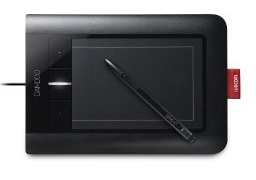
Third generation Bamboo (Connect, Capture, Create - Connect shown)
 [/spoilerboxx]
You'll want to stay away from either of the Bamboo Touch tablets - they do not feature pen input, they're just multitouch trackpads for your computer. Frankly, Apple did it better.
The other Bamboo models come in two sizes - basically small and large. For the second generation, Bamboo Touch, Pen, and Pen and Touch were the "small" ones, whereas the Fun and Craft were the "large" ones. For the third generation, the Connect and Capture are the "small", whereas the Create is the "large". For osu!, you'll probably be looking at getting one of the "small" sized tablets because it's a common strategy to reduce play area so that you don't have to move your arm when you play. However, it's personal preference as to whether or not you want a larger tablet area, and it's especially worth considering the "large" size if you are also into digital art; drawing is much more comfortable on a larger tablet.
So, here are my recommend options -
Second Generation - Bamboo Pen for small size, Bamboo Fun for large size.
Third Generation - Bamboo Connect for small size , Bamboo Create for large size.
At the time of writing, the "Small" sized tablets hover around $70, and the "Large" size Bamboos hover at around $170.
Of course, these prices will change slightly day to day on Amazon - the Wacom site has the Bamboo Connect listed at $79 and the Bamboo Create at $199.
Here's some links to purchase the latest models from Amazon. If you buy using these links, you will be helping support osu! .
.
Wacom Bamboo Splash Pen Tablet ($66.99)
Wacom Bamboo Capture Pen and Touch Tablet ($89.99)
Lastly, Intuos3 tablets can be had for very cheap on second-hand sites like eBay or Craigslist, and are definitely worth checking out if you're also going to be doing digital art as well. For osu!, however, the differences between the Intuos and Bamboo lines are negligible - the only real difference is that the Intuos lines have a much wider range of sizes than is available for Bamboo. I personally use a 9x12" Intuos3 for my art, and it still works like new after more than 4 years now.
In Short: Wacom's the recommend brand. Cintiq and Intuos tablets are too expensive and give no real advantage over Bamboo for osu!. See the recommend options above for the recommend models. Also try your luck at a used Intuos3 if you're also into art.
In Conclusion:
I hope this guide has cleared up some questions you may have about those tablets you've heard about and want to buy. These are only suggestions, however - there are certainly other brands out there that are cheaper than Wacom's tablets, but having tried tablets like the Mousepen, I would definitely say that you get what you pay for in terms of quality. Also, if you notice any mistakes in anything I've said here, or have anything to add, please say so in the comments.
I'll try to update this guide as new models come out to reflect changes in recommendations.
Good luck!
If you've been playing osu! and chatting with other players, you're bound to hear about so-called "tablets", and their effects on gameplay in osu!. Tablets are pads that operate with a stylus that connect to your computer. As you hover the pen around above the pad, the mouse cursor moves with the pen, and tapping the pen clicks the mouse. You can think of a tablet for osu! in the same way as you think of an arcade stick for fighting games - not necessary, but some players prefer it.
Their original purpose is to allow a greater degree of control in digital art applications, allowing the user to draw or paint on the computer as if they were using a pencil or paintbrush. The biggest difference that a tablet has over a mouse is that it features absolute tracking. This means that every point on the tablet corresponds to a particular point on the screen. If you lift the pen outside of the sensitive range, then put it down on another part of the tablet, the cursor will "jump" to that location. This is opposed to mice, which rely on relative tracking.
The biggest selling point of tablets for osu! is this absolute tracking - every other parameter such as pressure levels, tilt sensitivity, barrel rotation, etc. will have no effect on your osu! gameplay. These features are for digital art, where the tablet can sense things such as pressure you're applying, and make a darker pencil mark, for example. The only specification which may affect your osu! gameplay is "lpi", or "lines per inch". This is essentially the "resolution" of the tablet surface, or how little you have to move for the tablet to detect it. If a tablet has 100 lpi, then you have to move at least 1/100th of an inch for it to register movement. However, even the lowest lpi should be far higher than any monitor that you're likely to play on, so higher numbers have a mostly unnoticeable effect on gameplay.
In short: Tablets are an optional device to let you play the game in a different way. They were originally intended for digital art, but happen to work very well with osu!, and most specifications will make no difference in osu!.
Types of Tablets
Wacom is the "brand name" of tablets - tablets are all they make, and they're widely accepted (by artists) as producing the best quality, most reliable tablets. I recommend buying from Wacom because of their reputation as producing high-quality products as a leader in the tablet world. They produce three main lines:
Cintiq - "Draw directly on the screen" tablets, these are used in very high-end professional applications, and cost a pretty penny.
Intuos - The Professional line of tablets, these have features above and beyond the Bamboo line, but lack a screen.
Bamboo - The general consumer line of tablets, these come cheap with all the features you need to get started as a hobbyist.
There are other lines, such as the Graphire or Volito tablets, but these names have been discontinued, replaced by the above lines.
For osu!, you are very unlikely to need a Cintiq or Intuos - these two lines cater to professional in graphic design and illustration, and cost much more than the tablets in the Bamboo line. They feature increased pressure sensitivity, more bundled graphics software, and advanced features such as barrel rotation or tilt sensitivity. These mean nothing in osu!, so only buy one of these if you're planning on using your tablet for serious graphic design work outside of osu!.
At the time of writing there are three versions of the Bamboo, all confusingly under the same "Bamboo" moniker (The Intuos lines are distinguished by number - Intuos5 is the latest at the time of writing). I would recommend either buying the second or third generation Bamboos - the first generation Bamboo tablets had the extra buttons on the top of the tablet rather than the side, which makes them awkward for use in osu!.
[spoilerboxx]First generation Bamboo (Pen and Touch, Touch, and Fun - Bamboo Fun shown)
Second generation Bamboo (Pen and Touch, Pen, Touch, Fun, and Craft - Bamboo Pen and Touch shown)
Third generation Bamboo (Connect, Capture, Create - Connect shown)
You'll want to stay away from either of the Bamboo Touch tablets - they do not feature pen input, they're just multitouch trackpads for your computer. Frankly, Apple did it better.
The other Bamboo models come in two sizes - basically small and large. For the second generation, Bamboo Touch, Pen, and Pen and Touch were the "small" ones, whereas the Fun and Craft were the "large" ones. For the third generation, the Connect and Capture are the "small", whereas the Create is the "large". For osu!, you'll probably be looking at getting one of the "small" sized tablets because it's a common strategy to reduce play area so that you don't have to move your arm when you play. However, it's personal preference as to whether or not you want a larger tablet area, and it's especially worth considering the "large" size if you are also into digital art; drawing is much more comfortable on a larger tablet.
So, here are my recommend options -
Second Generation - Bamboo Pen for small size, Bamboo Fun for large size.
Third Generation - Bamboo Connect for small size , Bamboo Create for large size.
At the time of writing, the "Small" sized tablets hover around $70, and the "Large" size Bamboos hover at around $170.
Of course, these prices will change slightly day to day on Amazon - the Wacom site has the Bamboo Connect listed at $79 and the Bamboo Create at $199.
Here's some links to purchase the latest models from Amazon. If you buy using these links, you will be helping support osu!
.Wacom Bamboo Splash Pen Tablet ($66.99)
Wacom Bamboo Capture Pen and Touch Tablet ($89.99)
Lastly, Intuos3 tablets can be had for very cheap on second-hand sites like eBay or Craigslist, and are definitely worth checking out if you're also going to be doing digital art as well. For osu!, however, the differences between the Intuos and Bamboo lines are negligible - the only real difference is that the Intuos lines have a much wider range of sizes than is available for Bamboo. I personally use a 9x12" Intuos3 for my art, and it still works like new after more than 4 years now.
In Short: Wacom's the recommend brand. Cintiq and Intuos tablets are too expensive and give no real advantage over Bamboo for osu!. See the recommend options above for the recommend models. Also try your luck at a used Intuos3 if you're also into art.
In Conclusion:
I hope this guide has cleared up some questions you may have about those tablets you've heard about and want to buy. These are only suggestions, however - there are certainly other brands out there that are cheaper than Wacom's tablets, but having tried tablets like the Mousepen, I would definitely say that you get what you pay for in terms of quality. Also, if you notice any mistakes in anything I've said here, or have anything to add, please say so in the comments.
I'll try to update this guide as new models come out to reflect changes in recommendations.
Good luck!

 .
.